
A connected aircraft is not just about what happens in the cockpit. It is also about making the work around each flight more convenient: keeping databases moving, checking available aircraft information before leaving home, and getting useful records into your hands afterward.
Less database handling, without skipping the checks
With compatible avionics and the proper setup, GDL 60 can reduce the manual handling involved in keeping databases current. The aircraft must be registered in flyGarmin, with active PlaneSync and applicable database subscriptions. Downloads use internet-connected Wi-Fi or LTE; terrain downloads use Wi-Fi only.
The required battery-bus connection allows downloads while the aircraft is otherwise off. Most databases synchronize across the avionics at power-on, while charts synchronize and update in the background.
The important distinction is simple: a download is not the same as activation. Before departure, verify the database status on the avionics. Automation can make the process more convenient, but it does not remove that check from flight preparation.
Choose connectivity around what you want to do
A Wi-Fi-only PlaneSync plan supports automatic database updates and flight-log uploads over internet-connected Wi-Fi. For an owner whose priority is moving data at the hangar, that is a useful starting point for the conversation.
On-demand remote aircraft status is different. It requires an LTE-capable PlaneSync plan, cellular reception at the aircraft, internet access on your phone or tablet, and a compatible, adequately powered installation. A Wi-Fi-only plan does not provide that on-demand status capability.
These cloud features operate on the ground. Your phone having a strong connection does not establish that the airplane has one. Coverage, hangar conditions, service eligibility, and aircraft power all affect what is available when you request it.
Useful information starts with the right installed sources
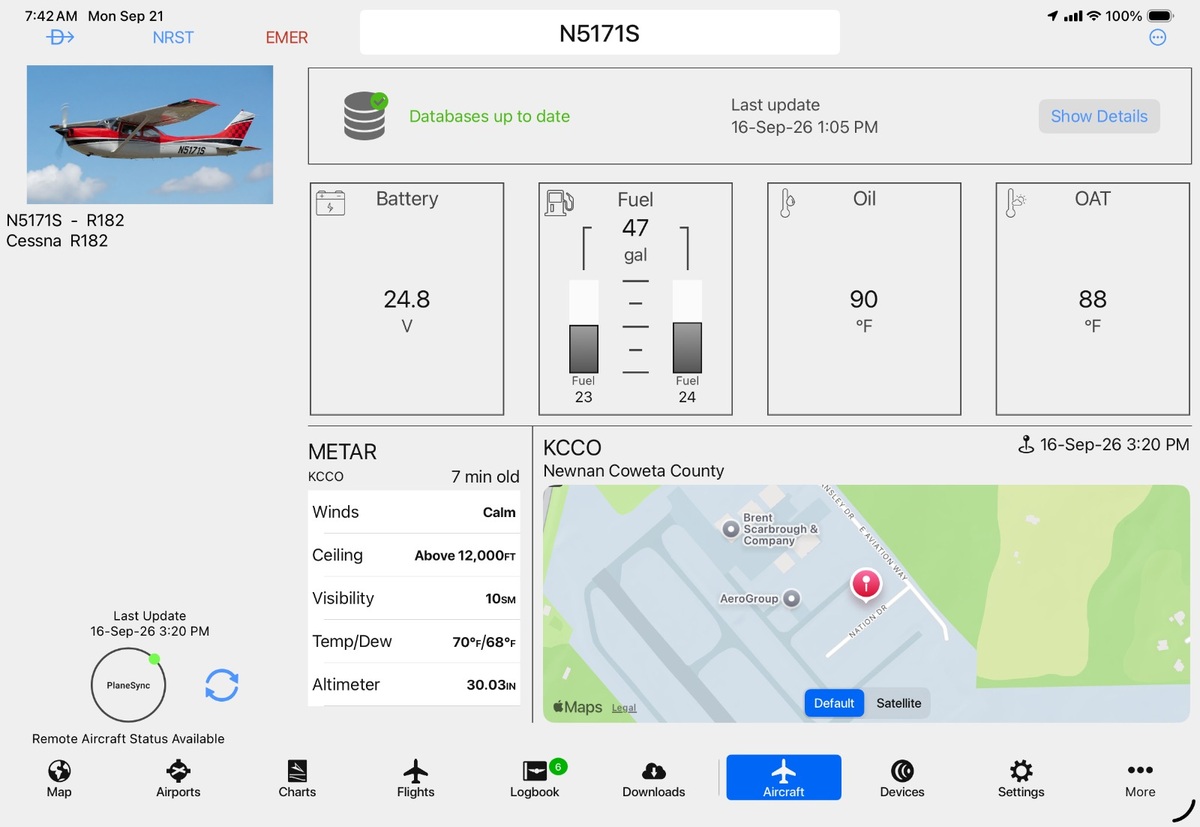
Depending on the installation, remote status can include fuel quantity, battery voltage, oil and outside-air temperatures, Hobbs and tach time, active and standby database information, and GPS location.
Those fields are not a universal checklist of what every GDL 60 installation will deliver. The connected equipment, sensors, and power provisions determine the available information. A fuel probe or temperature source may need its own power provision for remote status.
Current equipment compatibility
These are the current documented equipment families—not blanket approval for every aircraft. Garmin-approved software, the exact aircraft configuration, and the applicable installation approval determine eligibility and available features.
- GTN 625Xi, 635Xi, 650Xi, 725Xi and 750Xi: Compatible navigators. A GTN Xi alone does not supply all engine-monitoring data needed for remote status.
- G500 TXi / G600 TXi: Supported display integration and database functions.
- TXi EIS: Supported engine-data uploads and remote aircraft status with approved sensors and wake-power provisions.
- GI 275: Supported data/database functions. An attitude-only GI 275 does not provide engine or fuel sensing.
- GI 275 EIS: Supported engine logs and remote aircraft status with the appropriate engine interface, sensors and wake-power installation.
- G700 TXi: Listed as compatible in Garmin Pilot’s device table; aircraft-specific approval and features must be checked separately. The G500/G600 TXi retrofit approval does not automatically cover it.
- G1000 NXi, G2000, G3000 and G5000: Supported integrated-flight-deck families, subject to aircraft/OEM software and approval—not a universal GDL 60 retrofit for every aircraft with one of these systems.
- G3X / G3X Touch: Not compatible.
- AXIS: Compatibility coming soon.
For the examined Part 23 retrofit approval, a GTN Xi configured as GTN #1 is the minimum required interface. Remote aircraft status additionally requires approved G500/G600 TXi EIS or GI 275 EIS and the specified wake-power installation. These retrofit requirements should not be applied indiscriminately to integrated flight decks. Flight Stream 510/210/110 cannot be combined with GDL 60 under this examined approval.
Legacy non-Xi GTN, GNS and original non-TXi G500/G600 equipment should not be assumed to be direct PlaneSync hosts. Downstream database synchronization is different from full GDL 60 compatibility. RWAS can review the exact panel before recommending an upgrade.
Read the timestamp before the numbers
A remote dashboard is most useful when you understand how fresh its information is. The headline image shows “Remote Aircraft Status Available,” with aircraft-status readings dated September 16 at 3:20 p.m. and a separate database update timestamp. It is a dated example screen, not evidence of a current live connection or current aircraft condition.
An old fuel or voltage reading does not describe the airplane right now. A displayed location may be last known rather than current. Check the update time for the information you are reviewing, not just the values that catch your eye.
Remote availability also has an energy cost. Cellular standby uses battery energy, and even deep sleep consumes some energy. Battery-protection limits and configured energy budgets constrain availability. Deep sleep cannot receive the on-demand cellular wake trigger; scheduled wakes are a different mechanism. RWAS can review the approved setup rather than promise indefinite remote access or suggest copying another aircraft's settings.
After flight, put the records to work
With compatible equipment, active PlaneSync service, and connectivity, aircraft and engine logs can upload for review in flyGarmin or Garmin Pilot. Selected analysis services require connected accounts.
Easier access to records can support a more informed conversation with your maintenance team. It is not an automatic diagnosis, and some diagnostic uploads still require manual action. Think of the records as useful evidence for review—not a declaration that everything is healthy.
Prepare at home. Preflight at the aircraft.
Imagine checking the available aircraft status while preparing for tomorrow's trip, confirming when it updated, and arriving at the airport better informed. That is the practical appeal of connected aircraft management.
You still perform the normal aircraft preflight and avionics database checks. Remote information supplements preparation; it does not replace an inspection or determine whether the aircraft is airworthy.
Plan your connected upgrade with RWAS
Start with your aircraft, not a promise on a feature list. Roger Wilco Aviation Services can review compatibility, installation requirements, and the service options that fit your intended use.
Send your aircraft make, model, year, serial number and N-number, along with your installed avionics and the features you want most. Panel photos and available equipment details can help start that discussion.
Contact RWAS · (605) 299-8178 · avionics@rwas.team
Let's plan a connected upgrade around what your airplane can actually support.